How to download your 23andMe raw data
Your 23andMe results page only shows you a fraction of what's in your DNA. The full picture lives in your raw data file — the actual list of genetic markers 23andMe measured. Downloading it lets you explore far more than the standard reports, and import it into other tools. Here's exactly how to get it, what's inside, and how to read it without handing your genome to a stranger.
Because 23andMe is winding down: see the full checklist — download, delete, and keep your DNA privately.
Why download your 23andMe raw data at all
Most people log in, read the polished reports, and never think about the file underneath them. But there are several good reasons to download and keep your own copy of the raw data.
You own it, so keep a copy. The genotype file is the closest thing to a permanent record of the test you paid for. Reports can be redesigned, discontinued, or moved behind different subscription tiers over time — but a plain text file saved to your own drive is yours indefinitely, in a format that will still open decades from now.
It matters even more if you plan to close your account. If you decide to leave 23andMe or delete your data entirely, downloading the raw file first means you don't lose the underlying genotyping you already paid for. Deletion is meant to be permanent, so the order of operations matters: download first, then delete. This became a live concern for many customers after 23andMe's 2025 ownership change, when questions about what happens to DNA data when a company is sold moved from hypothetical to practical.
You can interpret it far more deeply elsewhere. The reports in your account cover a curated, deliberately conservative set of markers. Your raw file contains hundreds of thousands more positions — many of them well-studied variants that other tools can look up for health risk, carrier status, medication response, and traits. The download is what unlocks that broader analysis.
What is 23andMe raw data?
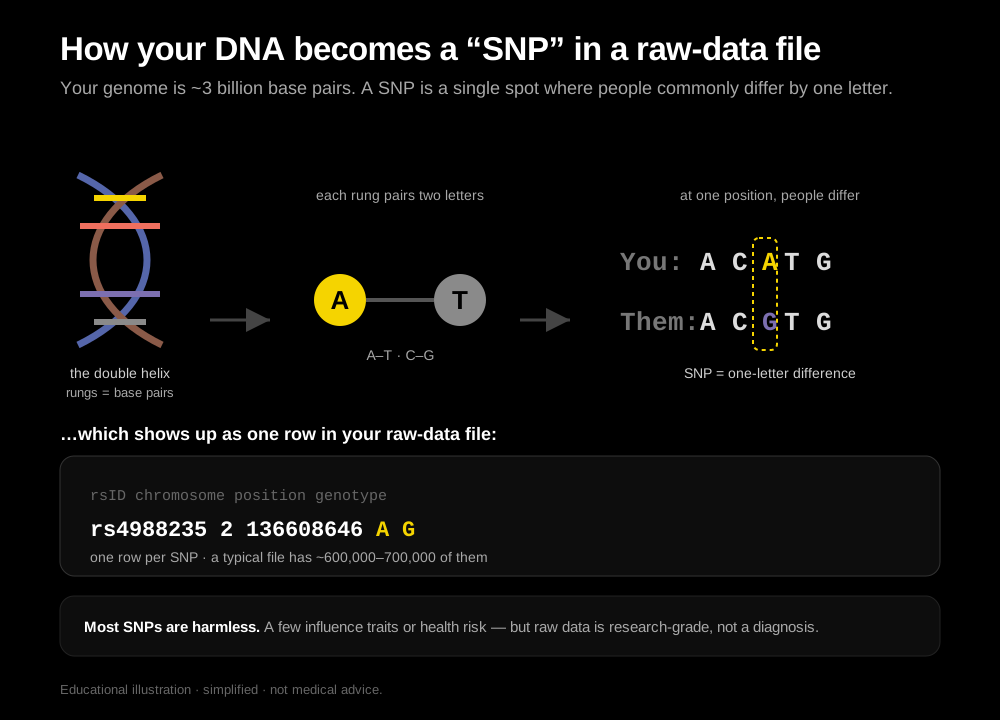
When 23andMe processes your saliva sample, it reads roughly 600,000+ specific positions in your genome called SNPs (single-nucleotide polymorphisms). A SNP is simply a spot in the DNA sequence where people commonly differ by a single letter. The polished reports you see in your account interpret only a curated subset of these. The raw data is the complete table of every marker they read — a plain text file you can download and analyze yourself.
It is not your whole genome. Whole-genome sequencing reads all ~3 billion base pairs and produces a far larger file; 23andMe uses genotyping, which checks a fixed panel of pre-selected positions. But that panel is more than enough to look up the great majority of well-studied health, carrier, and trait markers, because those markers were chosen precisely because they're common and informative.
How to download your 23andMe raw data, step by step
Raw-data download is done on the 23andMe website, not the mobile app. Set aside a few minutes on a computer, and be ready for a short wait before the file is actually available. On a computer:
- Log in to your account at 23andme.com.
- Click your profile name in the top-right corner and choose Settings.
- Scroll to the 23andMe Data section near the bottom of the page and click View.
- Confirm the profile, then find Download Raw Data. Re-enter your password and complete any security check to verify it's you.
- Submit the request. 23andMe generates your file and emails you a download link — this can take anywhere from a few minutes to about 24 hours.
- Open the email, click the link, and save the file. It downloads as a
.txtfile (sometimes inside a.zip) named something likegenome_Your_Name.txt.
23andMe occasionally redesigns its account pages, so the exact wording may shift. Look for the "23andMe Data" or "Download Raw Data" area inside Settings. After the company's 2025 ownership change, it's also a good moment to download and keep your own copy.
If the file is a .zip
If your download arrives as a .zip, just double-click it to extract the .txt inside. On most computers this happens automatically. You don't need any special software — the extracted file is ordinary text. Many analysis tools also accept the .zip directly, so you often don't have to unzip it at all.
Downloading from Ancestry, MyHeritage, and others
The same idea applies across the major consumer DNA companies, though the menus differ. If you tested with another service, our guides to downloading AncestryDNA raw data walk through those steps separately. The good news is that once downloaded, the files are similar enough in format that most interpretation tools accept all of them.
What your 23andMe raw data file actually is
Open the file in any plain-text editor and you'll see a short header (lines beginning with #) followed by one row per marker. Each row is tab-separated and has four columns:
- rsid — the reference SNP ID for the marker (e.g.
rs429358). This is a stable, public identifier that scientific databases use, so the same marker can be looked up anywhere. - chromosome — which of the 23 chromosomes the marker sits on (1–22, plus X, Y, and MT for mitochondrial DNA).
- position — the exact coordinate along that chromosome, based on a specific reference build of the human genome.
- genotype — the two letters (alleles) you inherited at that spot, one from each parent (e.g.
AG,CC, orTT).
A single line might look like rs429358 19 44908684 TC. Multiply that by several hundred thousand rows and you have your file. On its own it is completely unreadable to a human — nobody scans genotypes by eye — which is exactly why you need a tool to translate those letter pairs into plain-language findings.
Important caveats before you interpret it
Raw data is powerful, but it comes with real limits, and understanding them keeps you from over-reading it.
It is intended for research and educational use, not diagnosis. Consumer genotyping arrays are designed to be informative at population scale, not to be a clinical test for any one person. The raw data has not been validated the way a diagnostic lab test is, and 23andMe itself frames it accordingly.
Per-marker accuracy is generally high, but not clinical-grade. Genotyping arrays call the great majority of common markers reliably. But across hundreds of thousands of positions, some individual calls can be wrong — an occasional miscall, a no-call, or an ambiguous result. That's usually invisible in aggregate ancestry work, but it matters a lot if you're staring at a single health-relevant variant. A result you'd act on should be confirmed with a clinical-grade test ordered through a healthcare provider, and interpreted with a genetic counselor or physician who can weigh your full history.
Absence of a "risk" result is not reassurance. These arrays check specific pre-chosen variants. A file that doesn't flag a given condition simply means the tested markers weren't flagged — not that you carry no risk. Many important variants aren't on the array at all.
Treat the raw file as a starting point for curiosity and conversation, not as a medical verdict.
Keeping your raw data file safe and private
Your genotype file is uniquely sensitive — it's a piece of information you can never change, and it partly describes your blood relatives too. Treat it accordingly:
- Store it somewhere you control. A local drive or an encrypted personal backup is safer than leaving it in a shared downloads folder or an open cloud folder.
- Think twice before re-uploading it. Every place you send the file is another copy outside your control, subject to that service's policies, breaches, and future ownership.
- Be careful with sharing. Because the file reflects family DNA, sharing it affects relatives who never consented.
- Keep the original untouched. Work from a copy so you always have a clean master file.
What to do with your raw data next
Once you have the file, you can interpret it for health, carrier status, pharmacogenomics, and traits. Common things people look up include MTHFR variants, APOE4 status, and BRCA markers — see our complete guide to analyzing 23andMe raw data for the full picture, or compare the best tools to interpret it. To do that you feed the file into an analysis tool — and this is where the important choice comes in.
Want a look right now? Try our free DNA raw data explorer — drop your file and it's parsed instantly in your browser, with nothing uploaded. A quick taste of the on-device approach.
Is it safe to upload your raw DNA to third-party sites?
Most 23andMe interpretation tools ask you to upload your raw file to their servers. That means handing your genetic data — the one piece of information you can never change — to another company, subject to its policies, breaches, and whatever happens to it if the company is sold. Genetic data is uniquely sensitive, and uploading it is a one-way decision.
There is a safer path: analyze the file on your own device, so it never leaves your phone. Quanome takes this approach — you import your 23andMe raw file and it's parsed and read entirely on-device, with nothing uploaded to any server, so you can explore your genetics without creating another copy of your genome in someone else's cloud.
Frequently asked questions
What format is the 23andMe raw data file?
It's a tab-separated plain text (.txt) file, sometimes delivered inside a .zip. Each row lists one marker with its rsid, chromosome, position, and your genotype. The same general format is produced by Ancestry, MyHeritage, and others, which is why most analysis tools accept files from all of them.
Is my raw data file safe to keep?
Yes, as long as you store it somewhere you control — a local drive or an encrypted backup rather than an open shared folder. The bigger question is where you send it. Keeping one private copy for yourself is low-risk; uploading it to multiple third-party services multiplies the number of copies outside your control.
Can I upload it elsewhere to get more interpretations?
You can — most interpretation services are built around uploading your file. Just remember that every upload is a permanent copy handed to another company. If you'd rather not do that, choose a tool that reads the file locally on your own device instead of uploading it to a server.
Is it accurate enough to make health decisions?
Not on its own. Consumer genotyping is generally reliable per marker but is intended for research and educational use, not clinical diagnosis, and any single call can be wrong. Use the raw data to spark questions, then confirm anything health-relevant with a clinical-grade test and a qualified professional before acting on it.
Read your 23andMe raw data privately, on your device
Quanome unifies your labs, Apple Health, body data, and DNA into a single timeline on your device, with an AI coach that reasons across all of it — and nothing is uploaded. Learn more about Quanome →
Try the iOS beta →Frequently asked questions
Is downloading my 23andMe raw data free?
Yes. Downloading your own raw data from your 23andMe account is free. Some third-party tools then charge to interpret it; on-device options like Quanome avoid uploading it at all.
What file format is 23andMe raw data?
It is a tab-separated plain text (.txt) file, sometimes delivered as a .zip. Most analysis tools also accept this same format from Ancestry, MyHeritage, and others.
Can I read 23andMe raw data without a subscription?
Yes. The download itself needs only your 23andMe login. After that you choose how to interpret it.
What can my raw data tell me that the standard reports don't?
The reports cover a curated set of markers. The raw file lets tools check many more well-studied variants across health risk, carrier status, and medication response.
The Quanome iOS beta is live
Make sense of your DNA and health data privately — try Quanome free on TestFlight now (Android coming later).
Try the iOS beta →Free TestFlight beta for iPhone. Not on iOS? Leave your email and we'll keep you posted (and ping you when Android lands).